The main change is architectural: instead of exposing the agent to a large set of capabilities at once, Cascade loads specialized tools when they are required.
Cascade
Cascade is the new agent harness in Manus 2.0. It manages the model's context, tools, execution environment, files, and task state.
Instead of loading every available capability into the initial context, Cascade starts with a smaller configuration and adds specialized capabilities during execution.
A workflow can look like this:
Request → Cascade → Task analysis → Required capability → Tool / environment → Result
According to Manus's internal testing, compared with the previous agent architecture:
| Metric | Change |
| Token usage | −23.2% |
| Execution time | −28.2% |
| Execution cost | −32% |
These are internal Manus measurements, not independent benchmarks.
Manus 2.0 vs. Manus 1.6
Manus 1.6 focused mainly on agent reasoning and task completion. Manus 2.0 focuses more heavily on orchestration and execution infrastructure.
| Feature | Manus 1.6 | Manus 2.0 |
| Agent architecture | Manus 1.6 / Max | Cascade |
| Main optimization | Reasoning, task success | Tokens, latency, cost |
| Compute | Sandbox | Sandbox + Cloud Computer |
| Automation | Scheduled Tasks | Scheduled + event triggers |
| Workspace | Existing tools | Manus Studio |
| Video | Generation workflows | Timeline editor |
| Game development | General coding | Dedicated Game Dev |
| Computer interaction | My Computer | Computer Use + Remote Control |
| API | API v1/v2 transition | API v2 |
In short:
Manus 1.6 improved the agent. Manus 2.0 changes the infrastructure around the agent.
Cloud Computer
Manus already used Sandbox, an isolated virtual machine for executing agent tasks.
Manus 2.0 adds Cloud Computer — a persistent environment attached to a project.
This allows Manus to run workloads that must remain available after the initial task finishes:
- application backends;
- multiplayer game servers;
- persistent services;
- automation workloads.
Architecture:
Agent → Project → Application → Cloud Computer → Persistent service
Manus has not disclosed detailed Cloud Computer hardware specifications such as CPU, RAM, GPU, or storage performance.
Event-Driven Automations
Previous Manus workflows could run on schedules. Manus 2.0 adds event triggers.
A workflow can now start when an external event occurs:
New event → Trigger → Manus → Analysis → Tool execution → Action
Supported examples include events from email, Slack, Notion, calendars, and changes in advertising metrics.
This changes the execution model from:
prompt → agent → action
to:
event → agent → action
The agent can therefore execute workflows without a new manual prompt for every run.
Manus Studio
The desktop application is now Manus Studio, combining multiple project types in one environment.
It supports work with:
- documents, PDFs, spreadsheets, and presentations;
- websites and software;
- video;
- games.
Cascade activates the relevant capabilities depending on the project.
Video Editor
Manus 2.0 adds a timeline-based video editor.
Generated projects can contain separately editable:
- video clips;
- images;
- text;
- motion graphics;
- audio.
Instead of regenerating an entire video after a small change, individual elements can be edited.
Manus positions the editor primarily for 30–60 second videos, including UGC, tutorials, vlogs, ads, and data-driven motion graphics. An additional Alchemy mode combines video and code generation.
Game Dev
The dedicated Game Dev environment combines coding, image, and video models.
The workflow is roughly:
Prompt → Cascade → Code + Image + Video → Game project → Playable build
Developers retain access to the generated code and assets. Individual assets can be changed without regenerating the complete project. Cloud Computer can provide persistent infrastructure for multiplayer projects.
Computer Use
Manus 2.0 can interact with files, applications, and browser sessions on a user's computer after receiving permission.
This enables workflows such as:
Generate code → Build → Launch application → Interact with UI → Find error → Modify code → Test again
Remote Control allows users to observe and control these sessions from another device.
API v2
Manus provides a REST API v2 for integrating agent tasks into external applications. API v1 is deprecated.
API v2 covers tasks, projects, files, multi-turn interactions, and automated workflows.
Authentication supports API keys:
x-manus-api-key: YOUR_API_KEY
and OAuth 2.0:
Authorization: Bearer YOUR_ACCESS_TOKEN
Cascade and API v2 serve different purposes:
- Cascade manages internal agent execution.
- API v2 exposes Manus functionality to external software.
Manus 2.0 Technical Specifications
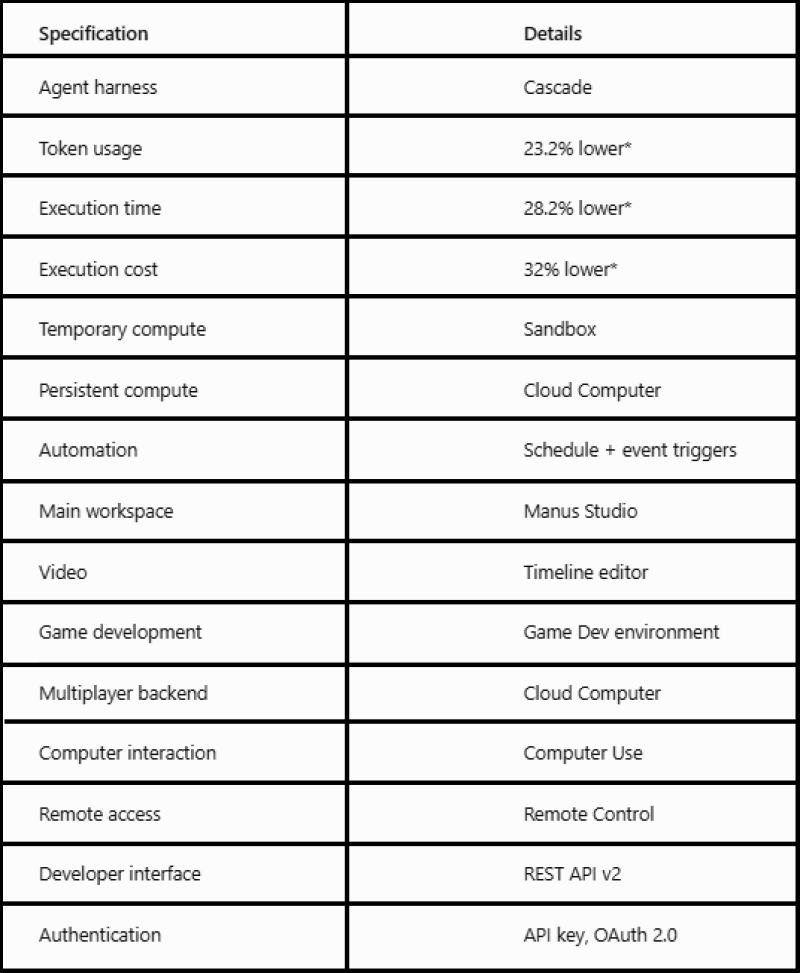
*According to Manus's internal comparison with its previous architecture.
What Manus Hasn't Disclosed
Several important technical specifications remain unpublished:
- Underlying models: the complete LLM/model stack used by Cascade.
- Context window: maximum supported context size.
- Cloud Computer hardware: CPU, RAM, GPU, storage, and networking specifications.
- Concurrency: maximum simultaneous agents and tool calls per project.
- Independent benchmarks: the 23.2%, 28.2%, and 32% improvements are Manus's own measurements.
Bottom Line
The main technical change in Manus 2.0 is Cascade. Instead of continuously expanding one agent's context with more tools, Cascade loads capabilities when they are needed. Manus reports that this reduces token consumption by 23.2%, execution time by 28.2%, and cost by 32% compared with its previous architecture.
Cloud Computer adds persistent infrastructure, Automations adds event-driven execution, and Manus Studio provides specialized environments for video, games, code, and documents.
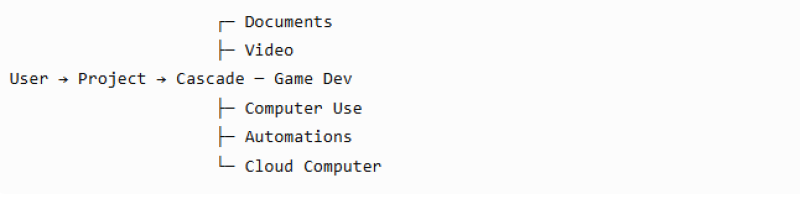
The resulting architecture looks like this:
Manus 2.0 is primarily an agent orchestration and execution-infrastructure update, rather than simply another LLM upgrade.